

System for an accounting firm
Every month, when invoicing time came, the person responsible reached for each client's binder - looked up the contract, checked the terms and calculated the amounts to be invoiced on a pocket calculator. Additional work never made it onto the invoices at all, because there was no place to record it. I built a system that automated this process: a database of all clients with individual terms, on the basis of which accounting services are billed automatically. The firm shortened its invoicing cycle and increased revenue.
The heart of a firm like this is the fact that almost every client is served on different terms. I built the entire system around that.
Fit above all
Below I describe a specific implementation - a CRM for an accounting firm - to show the range of possibilities. Keep in mind: your system can look completely different, so that it meets the needs of your organisation exactly. Nothing less and nothing more. No superfluous features - I implement only those that bring real business value.
Every client on their own terms
This is the greatest strength of this system. All clients are defined in a single database - over 220 in the implementation described here - and each of them can have completely different service parameters. With one client the contract was signed five years ago, at one set of rates; with another yesterday, at different ones. The system makes it possible to model each of these contracts individually, without compromises and without “averaging” the offer.
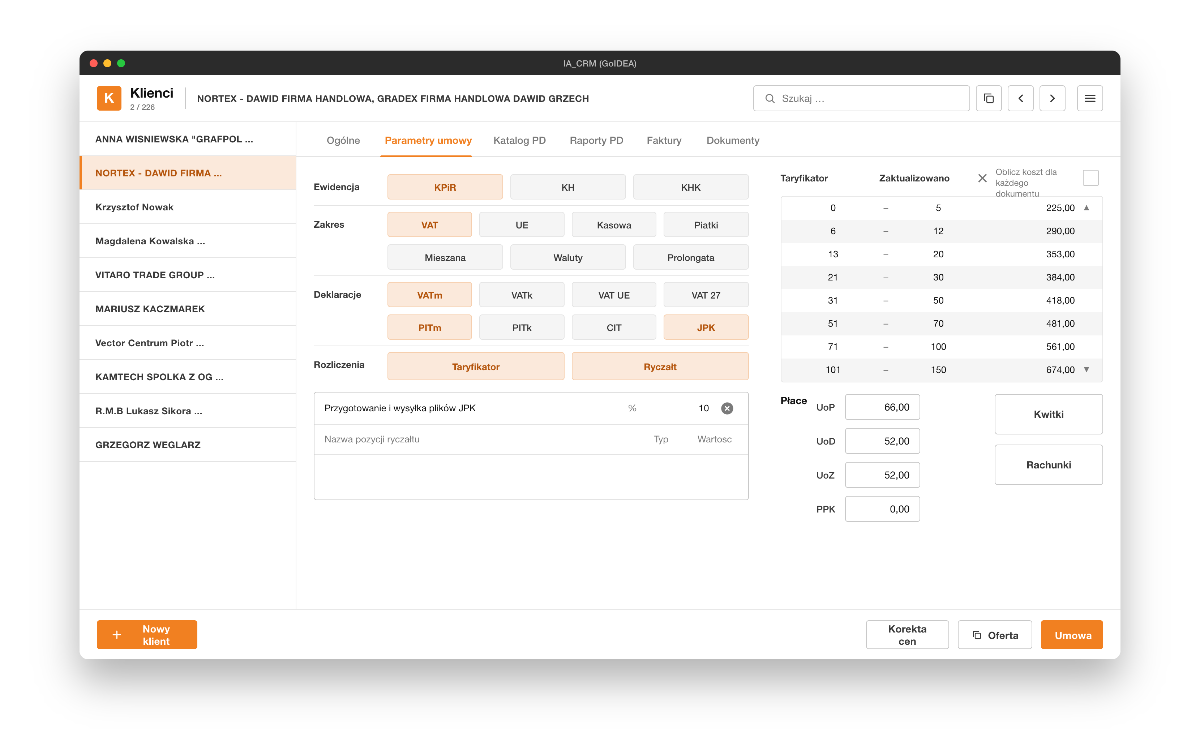
In the client record, on the contract parameters tab, one sets, among other things:
- the type of bookkeeping (revenue and expense ledger, full accounting books),
- the scope of service (VAT, intra-EU VAT, cash accounting, foreign currencies and more),
- the list of monthly filings for that client (monthly and quarterly VAT returns, EC sales lists, monthly and quarterly payroll and income tax, corporate income tax, the standard audit file),
- the billing model: a rate schedule or a flat fee.
Rate schedule, flat fee and per-employee charges
The first billing model is the rate schedule - tiered pricing based on the number of documents the client brings in a given month. For example: from 1 to 5 documents one rate applies, from 6 to 12 a higher one, and above several dozen another. Every month the system checks by itself which tier the client falls into and sets the invoice amount accordingly. The base rates themselves are variable too - they depend on the contract parameters in the client record, so two clients with different contracts have different rate schedules.
The second model is the flat fee - a fixed monthly charge regardless of the number of documents (for example for keeping the revenue and expense ledger), entered as an amount in the client record.
On top of that come two elements that increase the invoice:
- optional charges calculated from the rate-schedule amount - for example preparing and submitting the standard audit file as a percentage (say 10%) of the rate-schedule value,
- charges for the client's employees - separate rates for each employment contract, contract for specific work and civil-law service contract, as well as employee pension plans, multiplied by the number of employees in each group.
As a result, a single invoice consists of clear, verifiable parts: the base billing (rate schedule or flat fee), additional charges and the cost of payroll and HR services.
Catalogue of additional work
Beyond standard billing, every client needs something outside the contract from time to time - a consultation with the management board, training in using their software, issuing additional documents. For such situations each client has their own catalogue of additional work with a separate price list. Items from the catalogue appear on the invoice only when they actually occur.
Prices can be set individually for each client - if a client is entitled to a discount, a different amount is entered for them than in the base price list. The same tool therefore makes it possible to tailor the offer flexibly to a specific client.
Staff report completed additional work from a dedicated screen: they pick the client, pick the work, and the system files the item in the client record. The work becomes visible in reports and - most importantly - is automatically added to the next invoice, in line with the price list.
Complete history and archive in one place
The client record shows the entire history of the relationship: all invoices issued year by year, the number of documents in individual months, the number of employees by contract type and the invoice values. A separate section is the client's document archive - contracts and amendments as PDFs - so reaching terms agreed years ago takes only a moment.
From the record one can also add a new client, generate a quote or a contract ready for signature. Once a year, when prices are adjusted (for inflation, say), a single update covers all clients at once.
The checklist - the command centre of the entire firm
This is the system's second pillar. At the start of each month a checklist is generated - the system automatically places all active clients on it (every client has a status of active or inactive). Next to each one you can see which filings need to be completed that month: corporate income tax, quarterly and monthly income tax, quarterly and monthly VAT, EC sales lists, the standard audit file. This way no client and no obligation can be forgotten.
The status of each item is marked with a colour by clicking through the states:
- done - the filing is ready and awaiting submission,
- submitted - sent to the tax office,
- confirmed - the confirmation has come back from the office (case closed),
- problem - something went wrong; the staff member describes what it is, and the case is escalated to the manager, who decides what happens next.
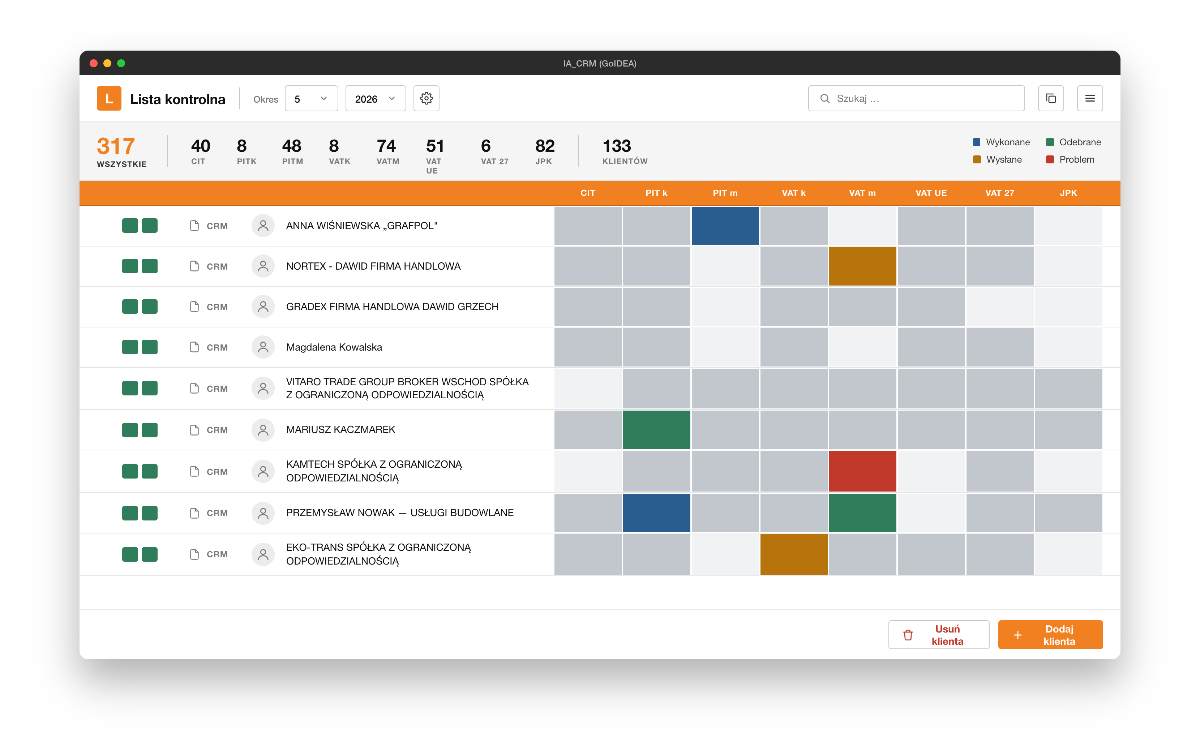
At the top of the list runs a summary panel showing how many tasks are still open in the month - separately for each filing type and in total. Every closed item lowers the counter. When all counters reach zero, the firm has completed its entire workload for the month. The whole team - each person individually and the company as a whole - sees in one place what stage the work has reached.
Invoices issued automatically, as e-invoices
For each client on the checklist, the person responsible fills in the month's data - the number of documents and the number of employees in the individual contract groups - and marks the items as completed. Only when all work for the client is closed does the button for creating the invoice appear.
The invoice calculates itself, based on the terms from the client record: base billing according to the rate schedule or flat fee, additional charges, a separate amount for payroll and HR, a separate one for bookkeeping. The client receives a clear breakdown: how many documents, how many contracts of each type, how many employee pension plans.
The system works with the national e-invoicing platform - the issued invoice goes into the platform automatically, receives its number, and a preview is available immediately. The solution stays compliant with current regulations.
This mechanism also serves as quality control. The list for the following month cannot be generated until an invoice has been issued for every client, and the invoice cannot be issued until all work for that client is closed. Closing the month therefore enforces completeness.
Mailings to clients
The system also includes a simple marketing module. Selected clients - or all of them - can be marked and sent a mailing in a few steps, informational or promotional, without retyping addresses and without switching to a separate tool.
From paper binder to automation
Before this system existed, each client's terms sat in a binder, in paper contracts. Every month the person responsible for invoicing pulled out contract after contract, looked up the agreed rates and issued each invoice by hand. That was several days of tedious work.
Today this happens automatically. Terms and additional work calculate themselves, invoices are created in a single step and go straight into the e-invoicing platform, and the checklist makes sure that no client and no document is overlooked.
Proven in practice
Thanks to the new CRM system on the FileMaker platform, we brought order to our complex client billing arrangements and automated our invoicing processes. We save a lot of time every month and have increased our revenue.
Joanna Liszkowska - CEO, inLAND Audit
(translated from Polish)
Your system can be the same, similar or completely different - tailored to the specifics of your firm: a different service profile (accounting, tax advisory, audit, legal services), a different billing model, different filings and roles in the team.
What sets my implementations apart
- Individual design - the system is built around the real processes of your company.
- Fast and flexible delivery - thanks to the FileMaker platform I deliver further modules and changes quickly, with little code, without multi-year IT projects.
- No need to plan everything up front - I implement further ideas at the pace they emerge while the finished features are being used.
- Clear interfaces - legible screens for accountants, invoicing staff and management.
- Regulatory compliance - integration with the e-invoicing platform and support for current filings.
- Growth alongside the company - as needs arise I add further modules and integrations, creating a system that grows with your business.
The next step
If you would like to see what a similar system could look like in your company - get in touch. We will talk about your current processes and which of them can be covered by a custom application. We will look at the places that consume the most time and should be addressed first. We will agree the first step - at the lowest possible cost - to check how quickly the collaboration delivers results, and talk about the stages that follow.
Book 30 minutes or write a message.
The first call is a calm conversation to get to know each other. I check whether I can genuinely help. No slides, no sales pressure. If I see it is a poor fit, I say so directly.
Prefer to write?
Briefly describe what you need - I reply within one business day. Often sooner.
Phone +48 601 789 966 - feel free to call, I answer the phone myself.