

Franchise and branch networks
Ziebart is an international brand for paint and vehicle protection - protective films, window tinting, ceramic coatings. While running the Polish Ziebart network, I built a FileMaker system that connects the entire network of branches and partner dealers: from the first enquiry, through booking and service delivery in the bay, to the invoice with its warranty and the settlement with the dealer.
The database covers thousands of customers and completed services. Below I show how this system runs the sales, service, settlements and marketing of the whole network from one place.
Fit above all
This system is tailored to a specific network and the way it works. I present it as an example: I want to show how a custom application can cover an entire network of service locations - sales, service and settlements - in a single, consistent tool.
Your system may look entirely different, tailored to the specifics of your company and your industry. What counts here is the way of arriving at the solution, and the application itself is an example of what is possible.
A network of branches and dealers in one system
Sales at Ziebart run along two paths: through the brand's own branches and through a network of partner new-car dealers, who refer customers for paint protection when they buy a car. Every service - film, ceramic coating, window tinting - is tied to a specific vehicle, an appointment in the bay and a warranty that runs for years.
To run all of this consistently across the whole network, I built one system. It keeps in one place the customers and their vehicles, enquiries and bookings, orders and service delivery, invoices with warranties, and the settlements with dealers along with the advisers' commissions. The same data set later feeds reports and marketing campaigns.
The customer record and the base of the whole network
Customer record
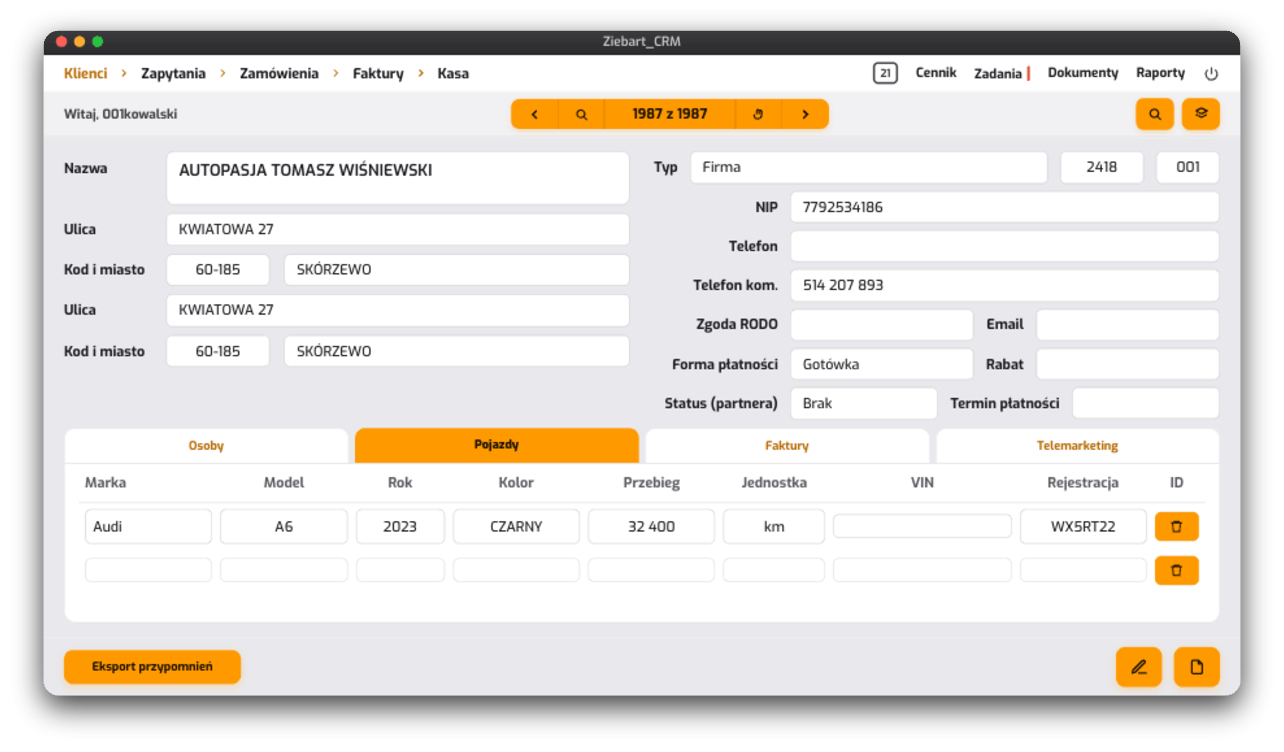
The customer record gathers in one place the details of the company or person, the payment terms and discount, and on tabs - the contact people with their roles and phone numbers, the customer's vehicles and the invoice history. From the record, the adviser sees at once who they are talking to and what has been done for this customer so far.
The customer's vehicles
The record also holds all the customer's vehicles - every car that has passed through the branch, with its services and warranties. When the customer returns, the adviser has the history of their cars in front of them and suggests the next service or a renewal of the coating.
From the enquiry to a booked appointment
The enquiry and its source
Every enquiry records where it came from - a phone call, a visit to the branch or a referral from a dealer - as well as which service it concerns and for which vehicle. From the same screen, the adviser sends the customer a text message and flags the chance of an additional sale.
Booking calendar
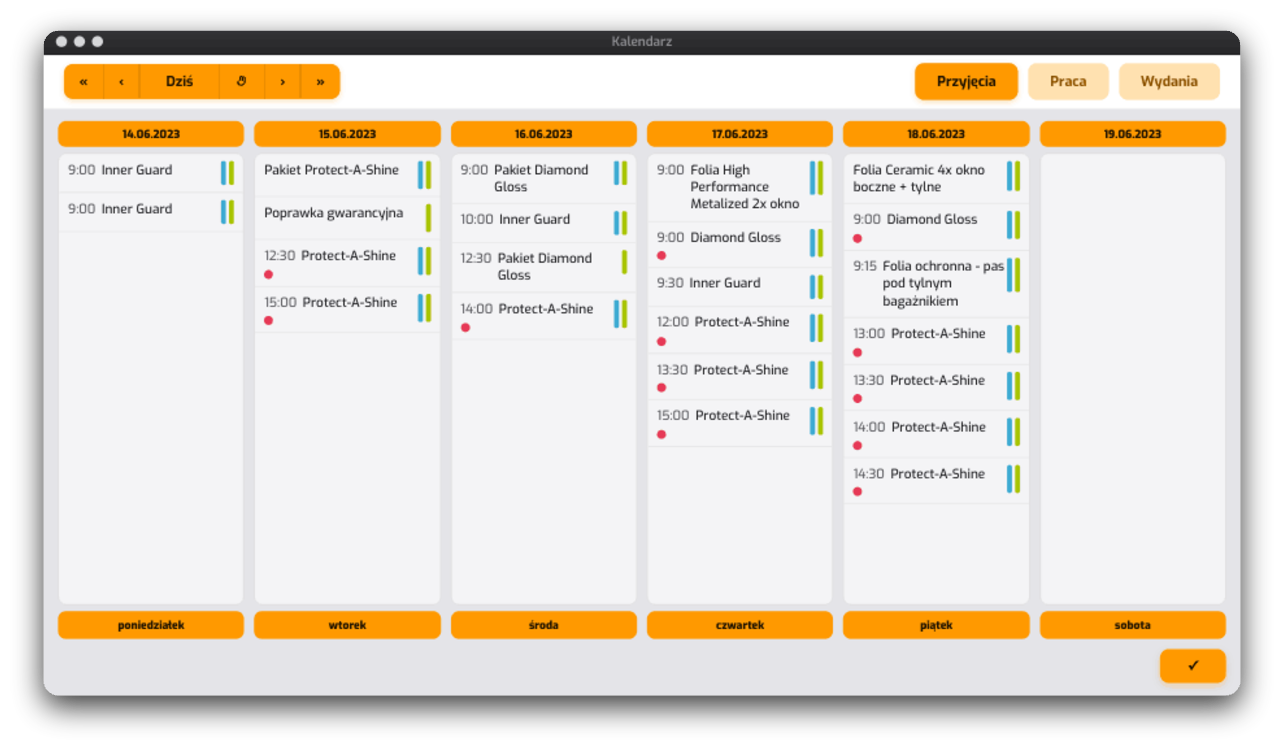
A confirmed enquiry becomes a booking in the weekly calendar - service by service, day by day. The branch sees the occupancy of the bays for the whole week and arranges the work so that cars come in and go out on time.
The order: vehicle, services and a body diagram
The vehicle and its technical data
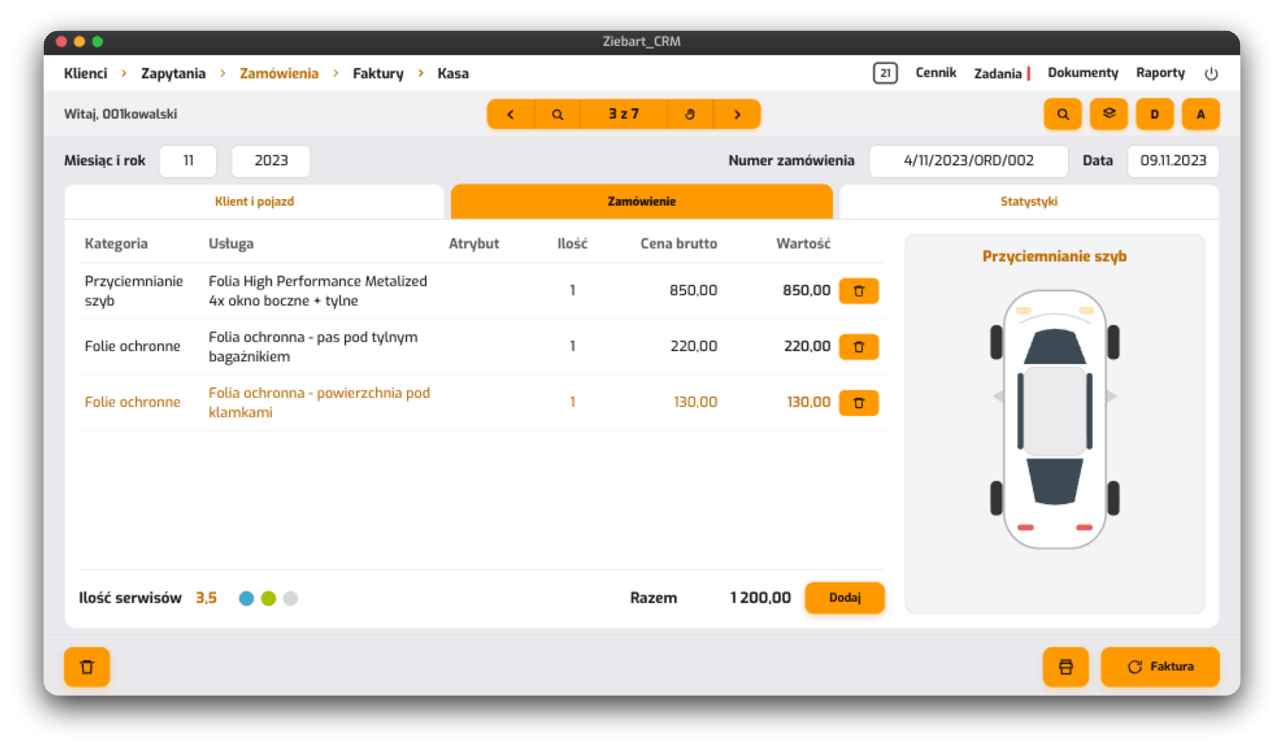
The order starts with the vehicle: make and model, year, registration number, colour, mileage and VIN, with the details of the customer and of the dealer who referred them alongside. Everything needed for the quote and the warranty sits with one car.
Service lines and the diagram
Services are added as lines from the price list - category, specific product, quantity and price - and the system keeps a running total of the order value. A body diagram shows which areas of the car a given service covers, so the scope of work is clear to the customer and to the bay.
Service delivery in the bay
Bay and technician
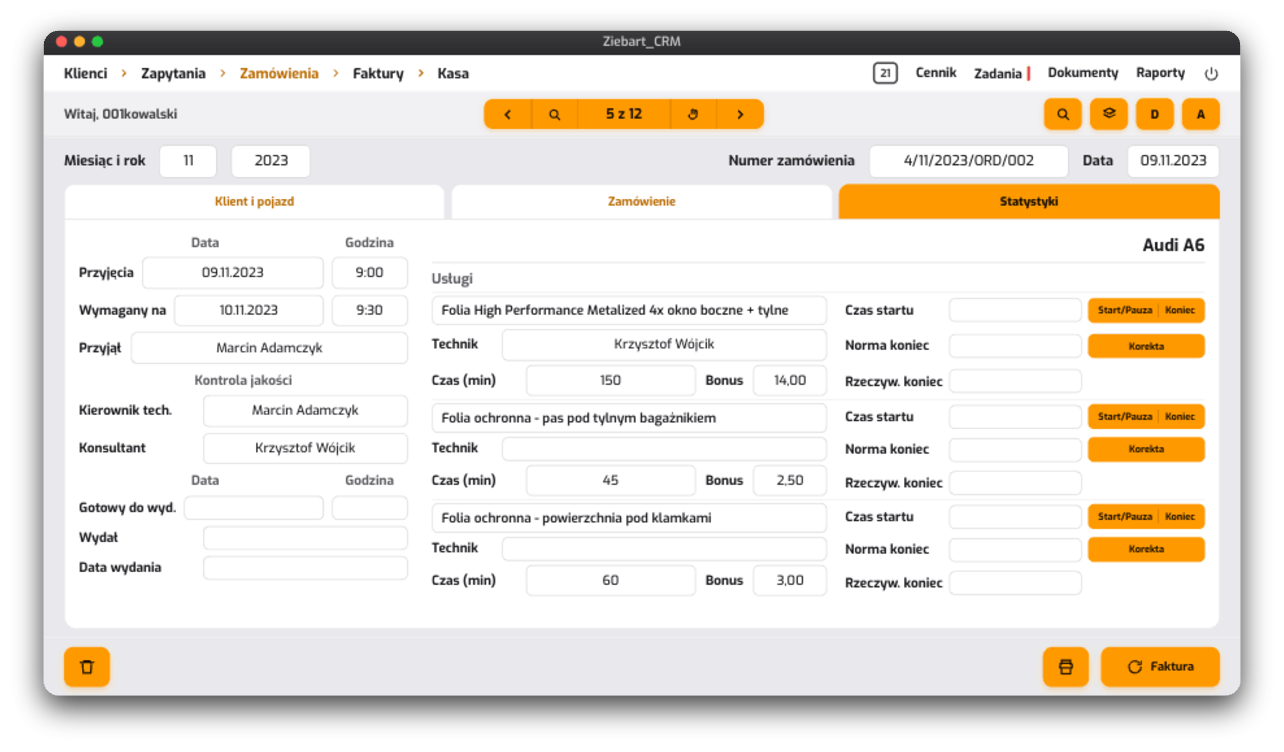
Each order line goes to a bay with an assigned technician. The system measures the working time - start, pause and finish - so it is visible how long a service really takes and who carried it out.
Handover schedule
Alongside the delivery, the system watches the deadlines: taking the car in, the time the customer requires and the handover. The adviser knows at any moment what stage a particular car is at and when the customer can collect it.
Invoice, warranty and the settlement with the dealer
Renewable warranty
The invoice closes the service and immediately creates a warranty. Some coatings carry a renewable warranty - at the next inspection the customer extends the protection, and the system suggests the renewal date. This turns a one-off service into recurring revenue.
Bonuses and the settlement with the dealer
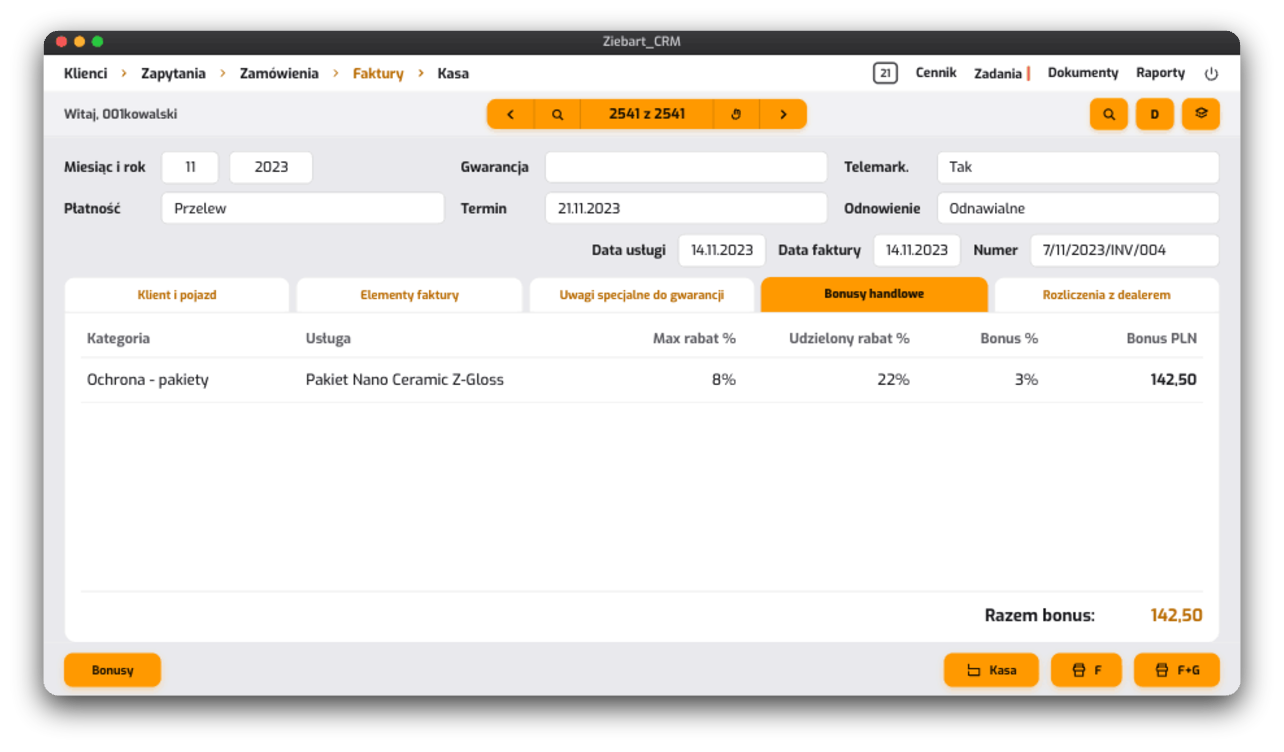
The invoice also calculates the sales bonuses - the discount granted relative to the maximum allowed - and the settlement with the dealer who referred the customer. Every sale shows how much stays in the branch and how much goes back to the partner.
The whole network's sales in reports
Sales through dealers
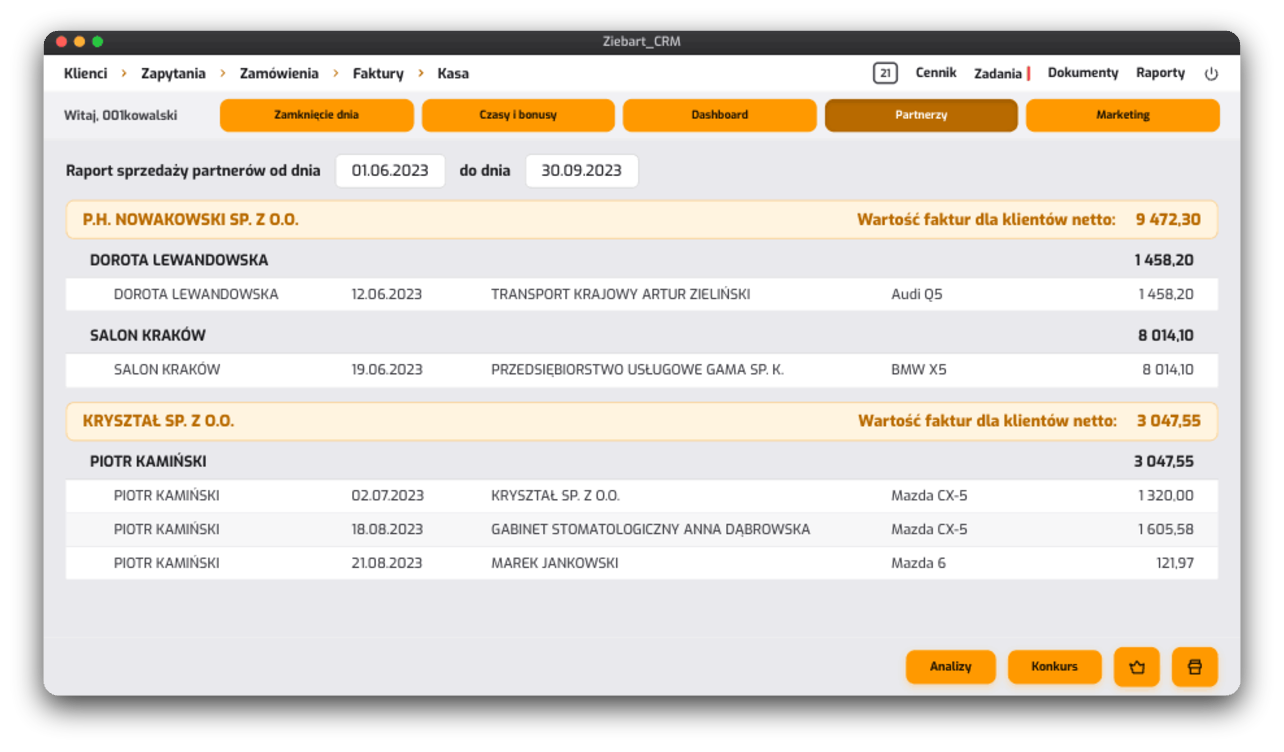
The partner report shows how many customers and what invoice value each partner dealer brings in, broken down by individual advisers. This makes it clear which partner drives the sales and where it is worth strengthening the partnership.
Day-end close and commissions
Other reports hold the daily routine together: the day-end close reconciles orders, invoices and the branch's cash - including the card terminal and the cash register - and a summary of times and bonuses calculates the advisers' commissions.
Where the customers come from
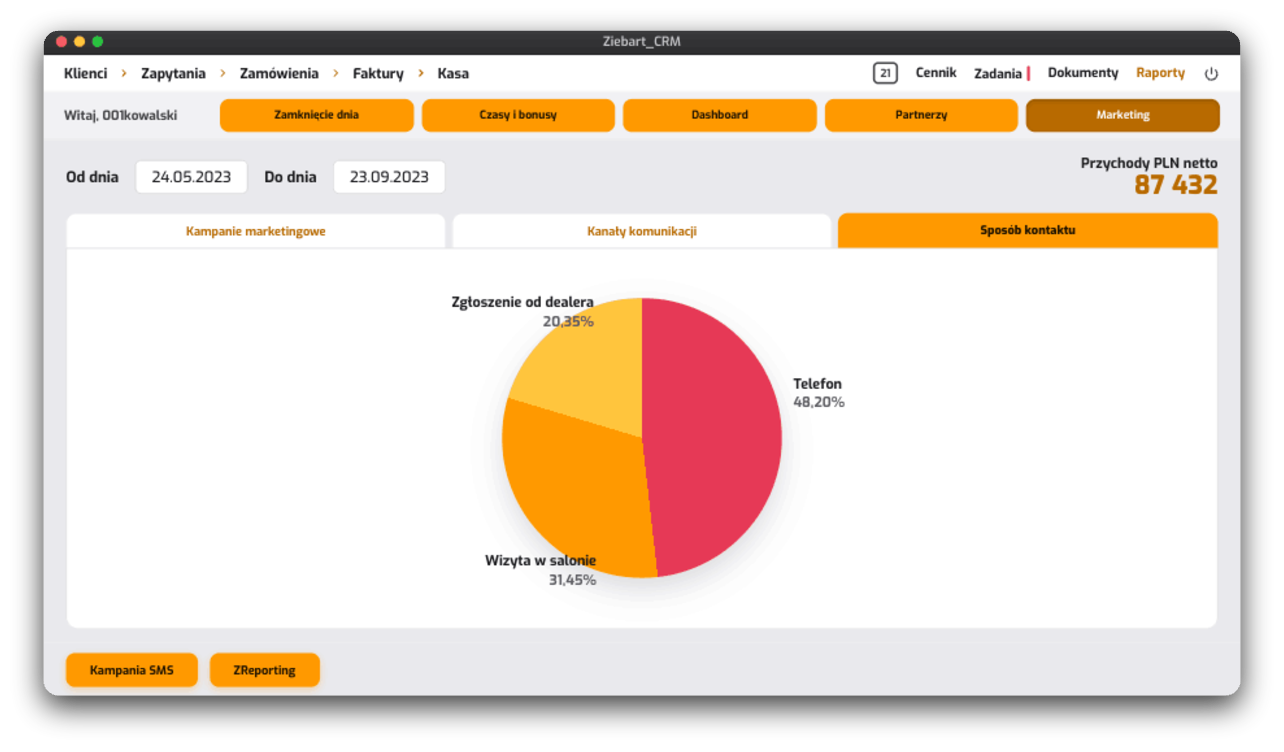
The same database feeds the marketing. Marketing reports show, for example, how customers find their way into the network - a phone call, a branch visit, a referral from a dealer - and which campaigns and channels bring revenue. From the same place, the branch launches SMS campaigns to selected customer groups.
This way, marketing decisions rest on real sales data. It is clear which channel deserves the budget, because it genuinely translates into visits and invoices.
One system for the whole network
This system shows its greatest value at the level of the whole network. The franchisor - the company that grants the franchise licence - sees every movement in the network from one place: all transactions, completed services and issued warranties in every branch. The revenue of the whole network breaks down into the individual branches, so it is plainly visible which location is growing and where the sales could use support. The entire network can be steered from a single management dashboard.
This experience carries directly into how I build solutions for GoIDEA's clients today: pulling the distributed work of a network of locations into one tool, in which every service is measurable and every settlement is clear to every party.
What I carry into your implementation
- The whole network in one system - branches, locations and partners work on a shared base of customers and services.
- A service measurable to the minute - the time in the bay, the cost and the margin of every service are visible as they happen.
- Settlements clear to every party - bonuses, commissions and partner settlements calculate themselves from the sales data.
- Recurring revenue from warranties - renewals and reminders turn a one-off service into a lasting relationship.
The next step
If you run a network of locations or branches, or you work with partners, and you would like to see what a similar system could look like in your company - get in touch. We will talk about your processes and about which of them a custom application can cover. We will agree the first, smallest possible step, to check how quickly the collaboration delivers results.
Book 30 minutes or write a message.
The first call is a calm conversation to get to know each other. I check whether I can genuinely help. No slides, no sales pressure. If I see it is a poor fit, I say so directly.
Prefer to write?
Briefly describe what you need - I reply within one business day. Often sooner.
Phone +48 601 789 966 - feel free to call, I answer the phone myself.