

X-Partner - my first system
X-Partner was the single-brand Xerox dealer in Poland. That is where I built my first system in FileMaker, for myself, for my own daily work: a sales funnel with opportunity scoring, service forecasting, segment mailings, projects and budget control - all in one application.
That moment marks the beginning of the way of working I now call the GoIDEA platform. Below I show what this system did and why building it myself changed my perspective on business software.
Fit comes first
This system was built many years ago - it is my first large FileMaker project. I bring it up as inspiration: I want to show a path you can take, building your own software step by step from a single real need.
Keep in mind: your system may look entirely different, tailored to the specifics of your company. What counts here is the way of arriving at the solution, and the application itself is only an example.
A tool that did not exist on the market
Selling and servicing multi-year contracts at a Xerox dealership means hundreds of clients, dozens of machines at each of them and service spread over years. Off-the-shelf programs either failed to match this way of working or cost so much that buying them made no sense. So I built my own - shaped precisely around how the work of my company really looked.
The system grew piece by piece, at the pace at which real needs appeared: first the client record, then the funnel, service, marketing and projects. I added each module when it proved necessary.
CRM and the client record
Client record
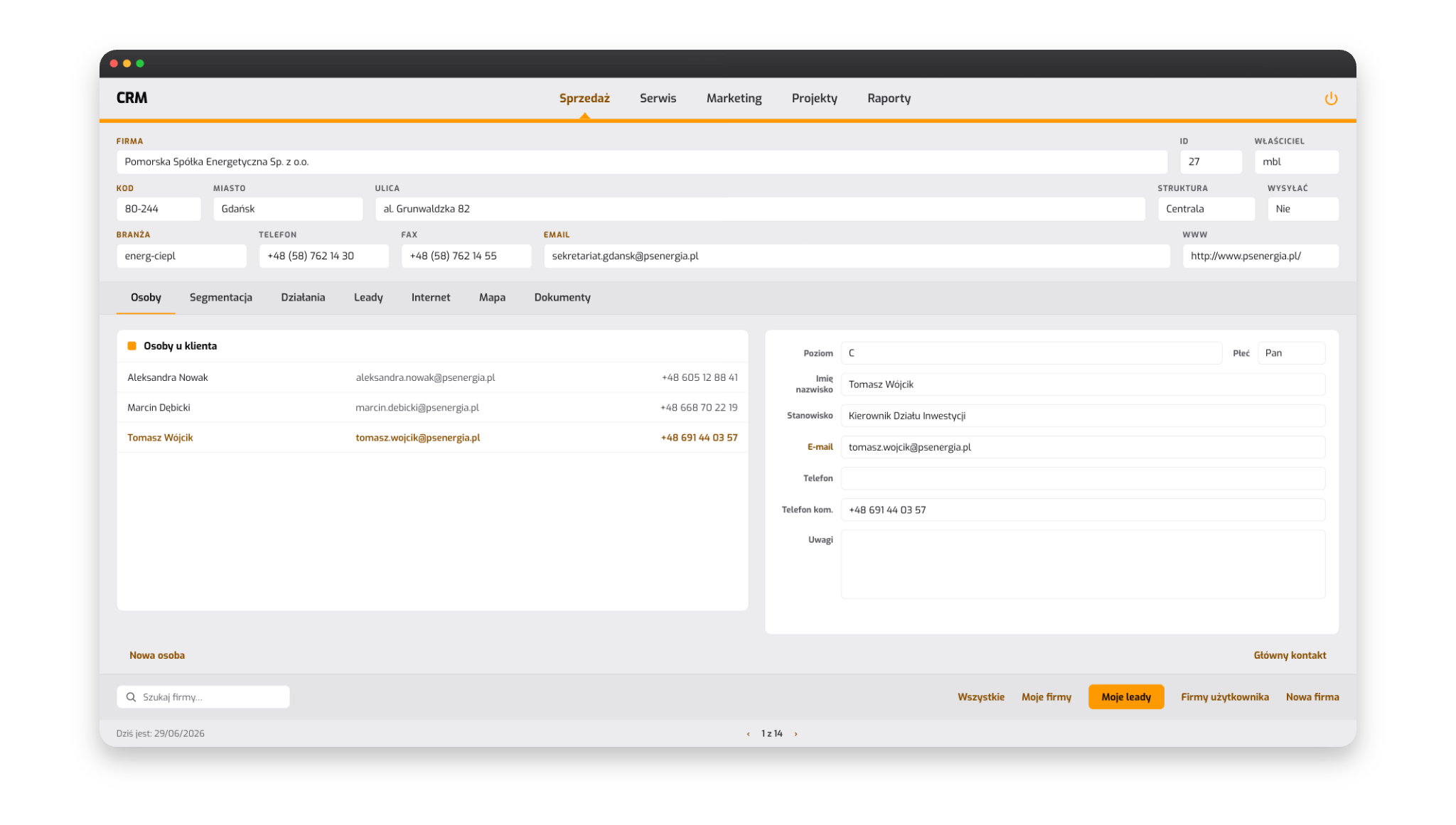
The heart of the system was the client record. In one place I kept the company data, all contact people on the client's side - with roles, positions and direct phone numbers - and the history of the relationship. From the record I marked the client's level, assigned them to a segment and saw at once who my main contact was.
The record's tabs - people, segmentation, activities, leads, internet, map, documents - arranged all knowledge about the client into a single screen. The whole history of the collaboration was at hand, in one place.
Segmentation
I assigned every client to a segment by industry, product and region - and filtered the whole database by these segments: who receives a given offer, which group a campaign covers, where to concentrate service. The same division later drove marketing and reports, so sales, marketing and service looked at clients in the same way.
Opportunity scoring and the value of every lead
The sales funnel
The sales funnel is the view of all opportunities arranged by stage - from first contact to close. I kept it so that at any moment I knew how much was really in the sales process and what to tackle first. The name comes from the shape of the overview: many opportunities enter at the top, and ever fewer reach the close - the view narrows towards the bottom like a funnel.
Value and margin
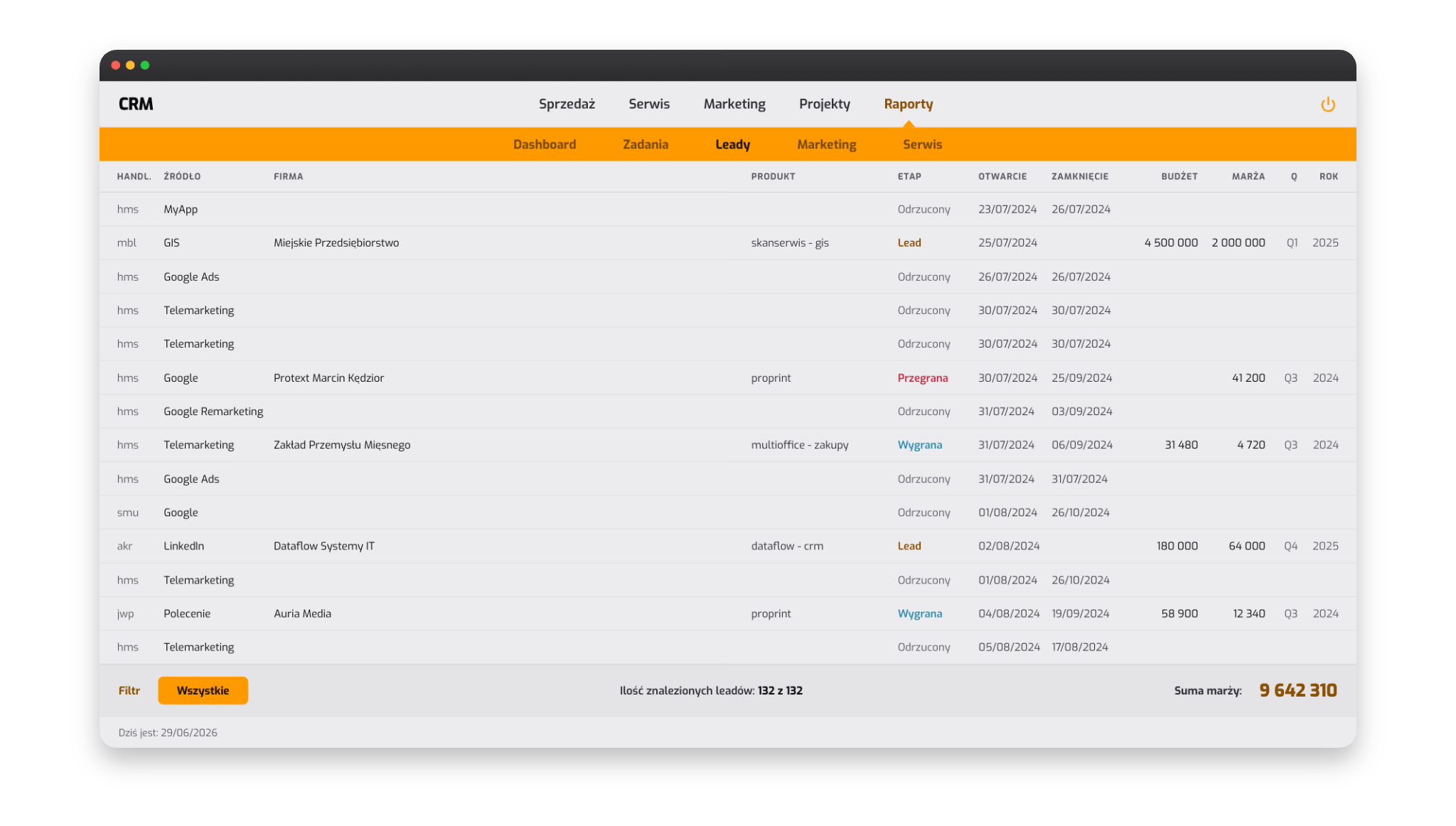
Every lead had its source - from telemarketing through campaigns to referrals - plus an assigned value and margin. This way the funnel showed the real potential of each opportunity: budget, expected margin, stage and closing quarter.
I could see where the effort was worth it and which opportunities to let go. The margin total at the bottom of the overview was the simplest possible answer to the question of how much is really in the funnel.
Service forecasting
With Xerox machines, service is a separate, long life cycle of the device - from installation through maintenance and consumables to the moment when replacing the machine with a new one pays off. The system tracked this cycle for each client individually.
The prediction mattered most. Based on the age and usage of the device, the system calculated when its end of life was approaching and raised a reminder on its own - so the client could be contacted at the right moment and offered a new machine. The conversation about replacing the equipment therefore took place when the client was ready for it, and the sales rep had all the dates in one place.
Each such reminder went straight onto the task list of the responsible sales rep, together with the client record and the history of the equipment so far. Service thus became a source of planned, repeatable sales.
The sales rep's day on a single dashboard
Daily dashboard
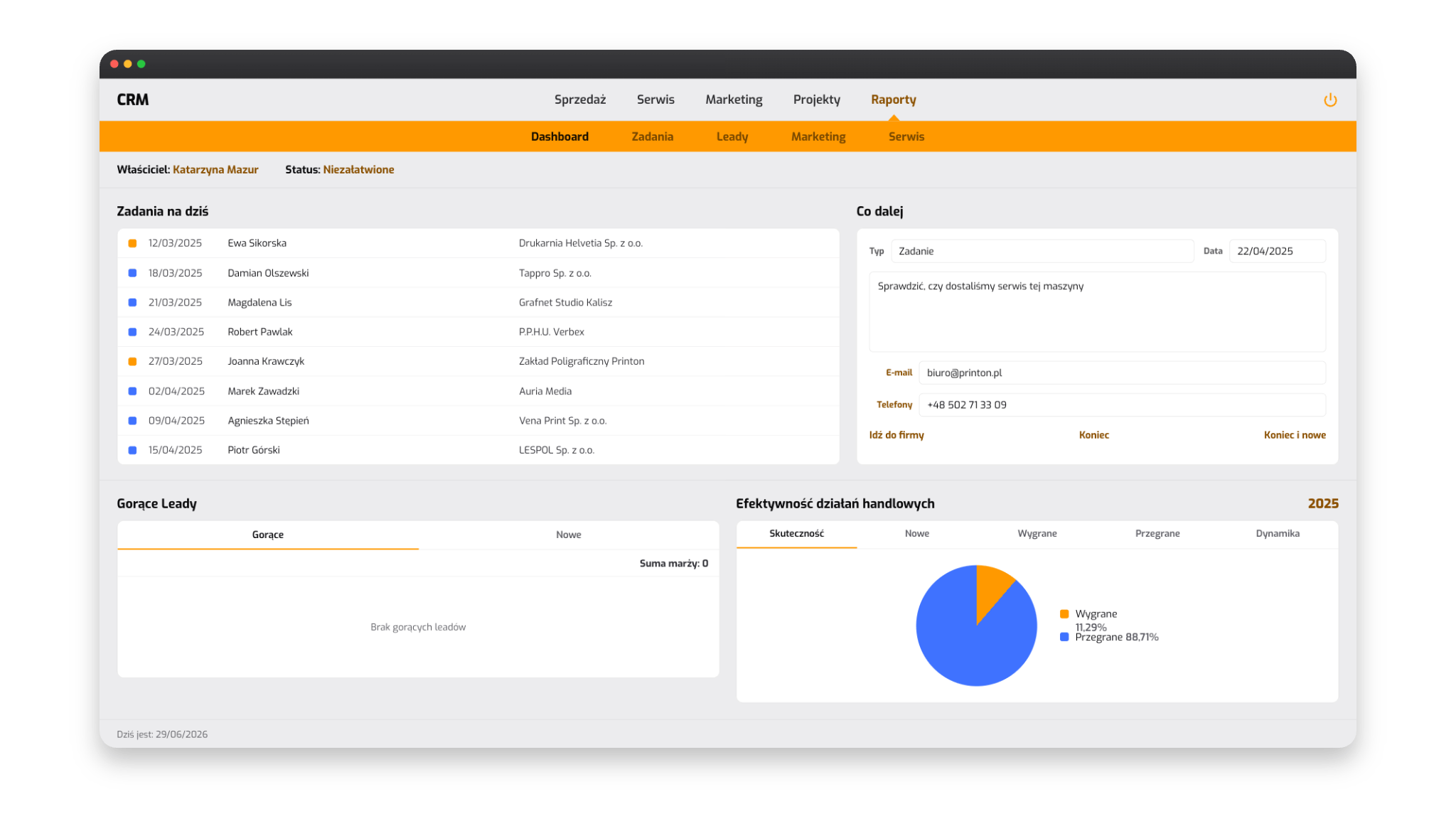
A dashboard held the daily work together. On one screen I had the task list for the day - including service reminders - and the hot leads, meaning opportunities worth acting on right away.
Results as they happen
Next to the tasks, the dashboard showed a chart of sales effectiveness - opportunities won versus lost. I saw the results as they came in, and the quarterly summaries emerged on their own from the same data.
The dashboard was the starting point of every day: it showed what to tackle first and where the company really earns its money.
Marketing campaigns to segments
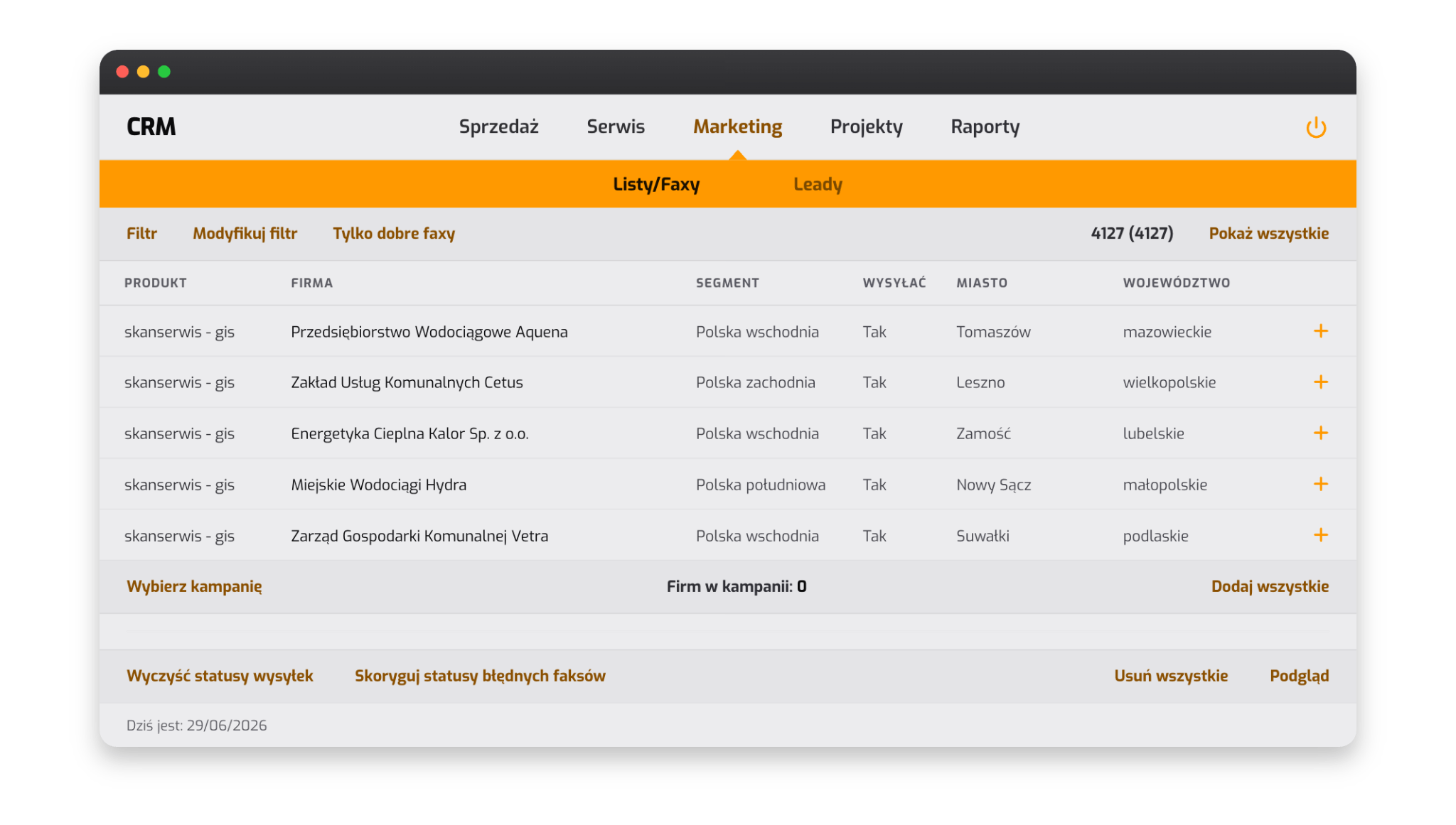
The database held thousands of companies grouped into segments - by product, region and province. From the same system I launched information and sales campaigns: I picked a segment, built the recipient list and sent them messages straight from the system, based on the data already in it.
The delivery statuses flowed back into the system, so I knew what had arrived and what needed correcting. Marketing and sales worked on one shared client base.
Projects: resources, schedule, costs and revenue
A large part of the work consisted of IT projects - system implementations and integrations at the client's site. The sale of solutions entered here only when it required a lengthy implementation. I ran each such project separately, and the project record gathered in one place everything that made up its delivery.
Resources and schedule
I planned who from the team ran which tasks and on what dates. In an IT project, human work is the most expensive part, so the team's time was the main resource to plan, with hardware playing a secondary role. At any moment I could see what stage a given implementation was at, what was coming up next and who was responsible for it.
Costs and revenue
The largest cost item was the team's time recorded on timesheets; on top of that came business trips (who travels, where, for what purpose and by what means of transport) and materials. On the revenue side stood the contract value. This way I knew straight away whether a project was profitable, and the budgets - including the IT budgets - were measurable and assigned to a specific implementation.
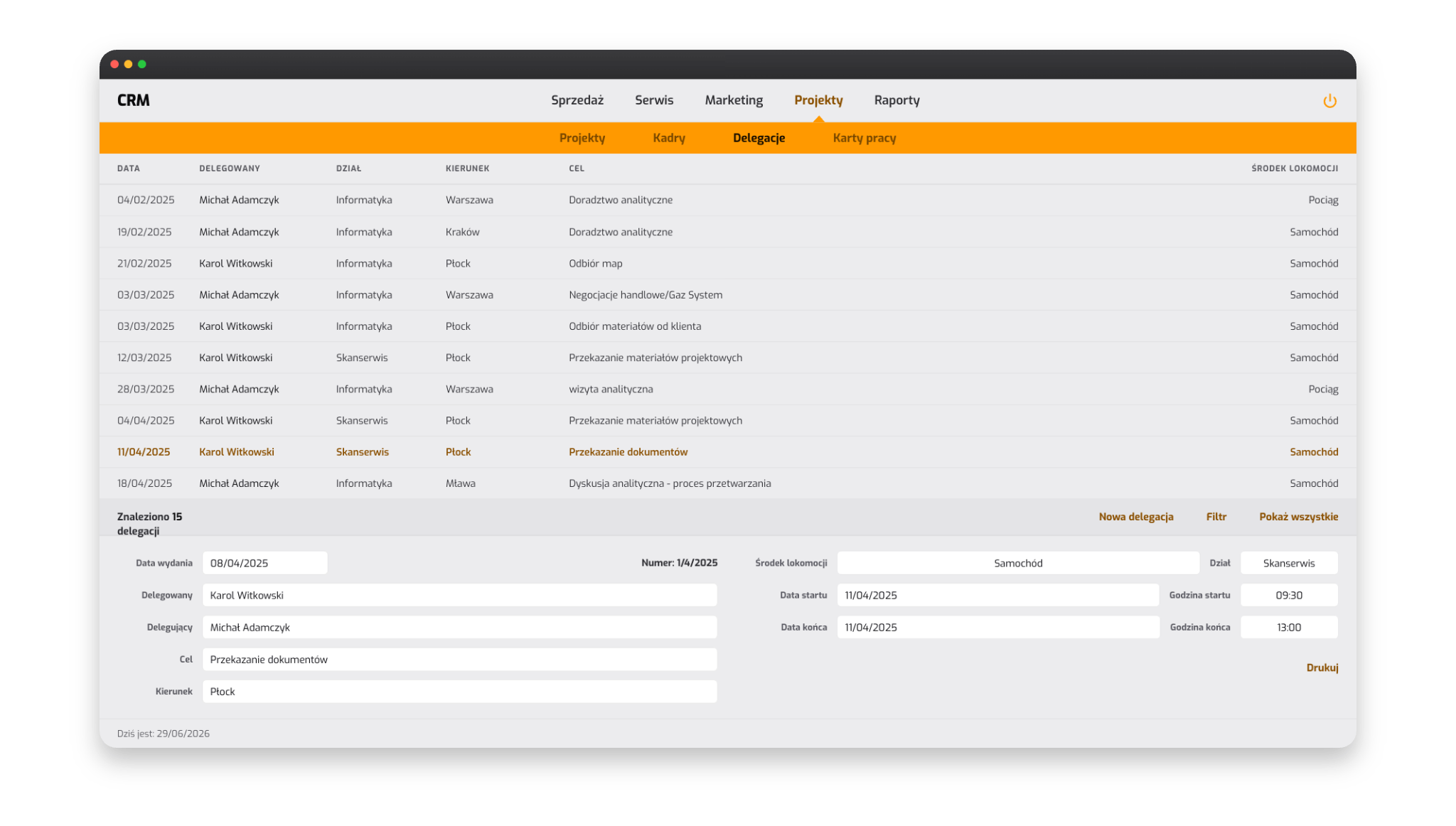
This is where the GoIDEA platform began.
I did not plan this system in full up front. I added a module when some piece of the work started to chafe - and so, from a single client record, a tool grew that covered the sales, service, marketing and projects of one company.
That experience shaped the way I work to this day: start with the one process that hurts the most, deliver a working feature quickly and grow the system together with the company. This is exactly how I build solutions for GoIDEA clients today.
What I carry over into your implementation
- One system instead of many tools - sales, service, marketing and projects on a shared client base.
- Built around the real process - the system reflects how you actually work.
- Incremental growth - I add modules at the pace your needs appear. The decision stays with you.
- Measurable costs and potential - a funnel with opportunity scoring and budgets assigned to projects give a real picture of the results.
The next step
If you would like to see what a similar system could look like in your company - get in touch. We will talk about your current processes and which of them a custom application can cover. We will agree the first step - at the lowest possible cost - to check how quickly the collaboration delivers results.
Book 30 minutes or write a message.
The first call is a calm conversation to get to know each other. I check whether I can genuinely help. No slides, no sales pressure. If I see it is a poor fit, I say so directly.
Prefer to write?
Briefly describe what you need - I reply within one business day. Often sooner.
Phone +48 601 789 966 - feel free to call, I answer the phone myself.