

Production management system
Kubitech manufactures components from plastics and light alloys for the food, medical and automotive industries. As the company grew, Microsoft Excel stopped keeping up - work orders, specifications and customer order data lived in separate places, and changes were failing to reach the shop floor on time. Together with the client, I built a system that connects the office, the shop floor and the warehouse: from the customer order to real-time production status. Today the whole company uses it - and every specification change appears instantly for all users. The system manages orders, production routings and warehouse materials, and makes real-time production planning easier.
Fit above all
Below I describe one specific implementation - a production management system - to show a range of possibilities. Keep in mind: your system can look completely different, so that it meets the needs of your organisation exactly. Nothing less and nothing more. Zero unnecessary features - I build only those that deliver real business value.
From the customer order to the optimal work order
Most companies start with ERP systems, or even Excel spreadsheets, that record orders and other important data but offer no real support for production planning. My system begins exactly where standard systems stop.
Customer order
Every customer order enters the database with its lines, delivery date, currency, priority and other parameters. From a single screen you see all the lines that need to be produced - regardless of how many orders they come from.
Aggregating many orders
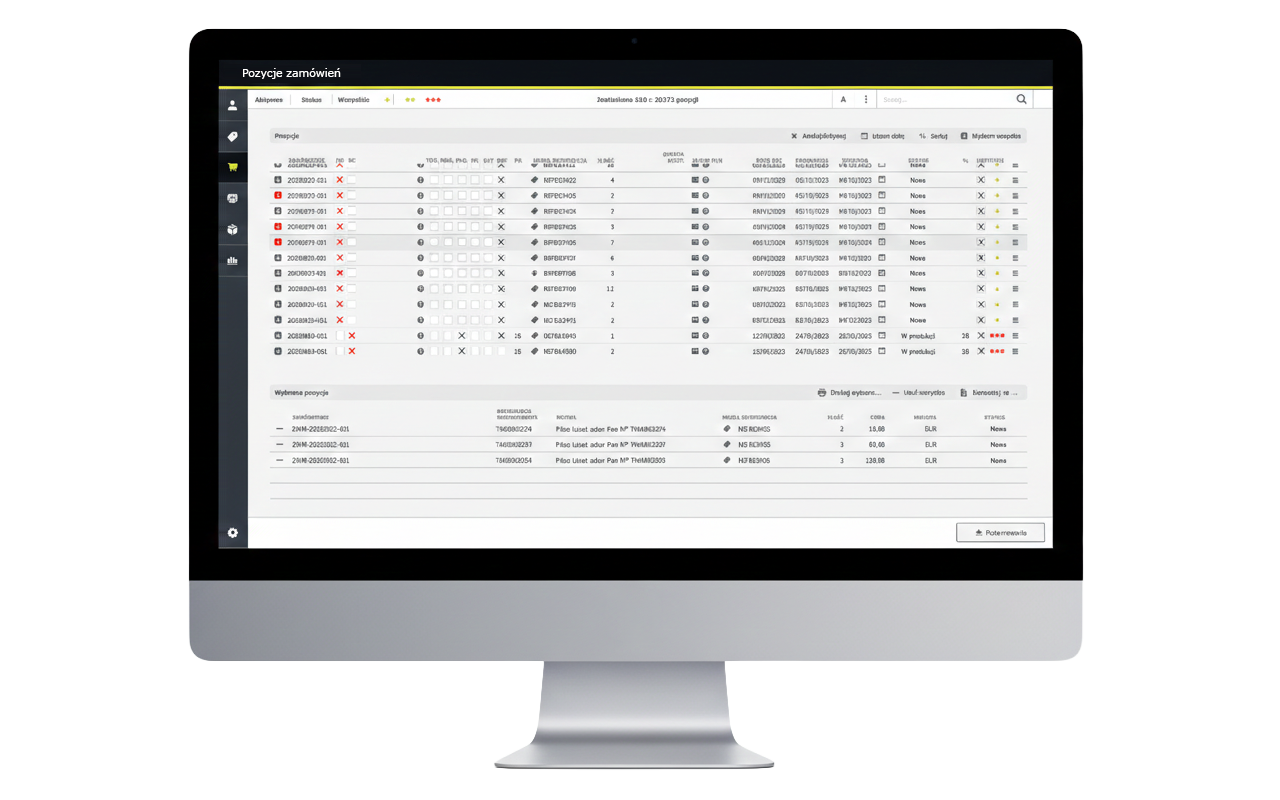
A dedicated “Order lines” view aggregates all lines from all orders: their production status, priority, the delivery date required by the customer, the planned production date and the dispatch date.
In a few clicks, the planner can:
- select lines from different orders,
- combine them into a single work order, provided the routing and the deadline allow it,
- adjust priorities to the current capacity of the shop floor and the utilisation of resources.
The heart of the planning system
Instead of producing “per order”, you produce in batches optimised for efficiency. Splitting orders into lines and freely arranging them into work orders becomes the central point of the planner's and the foreman's work.
Product and routing - the foundation of planning
Product card
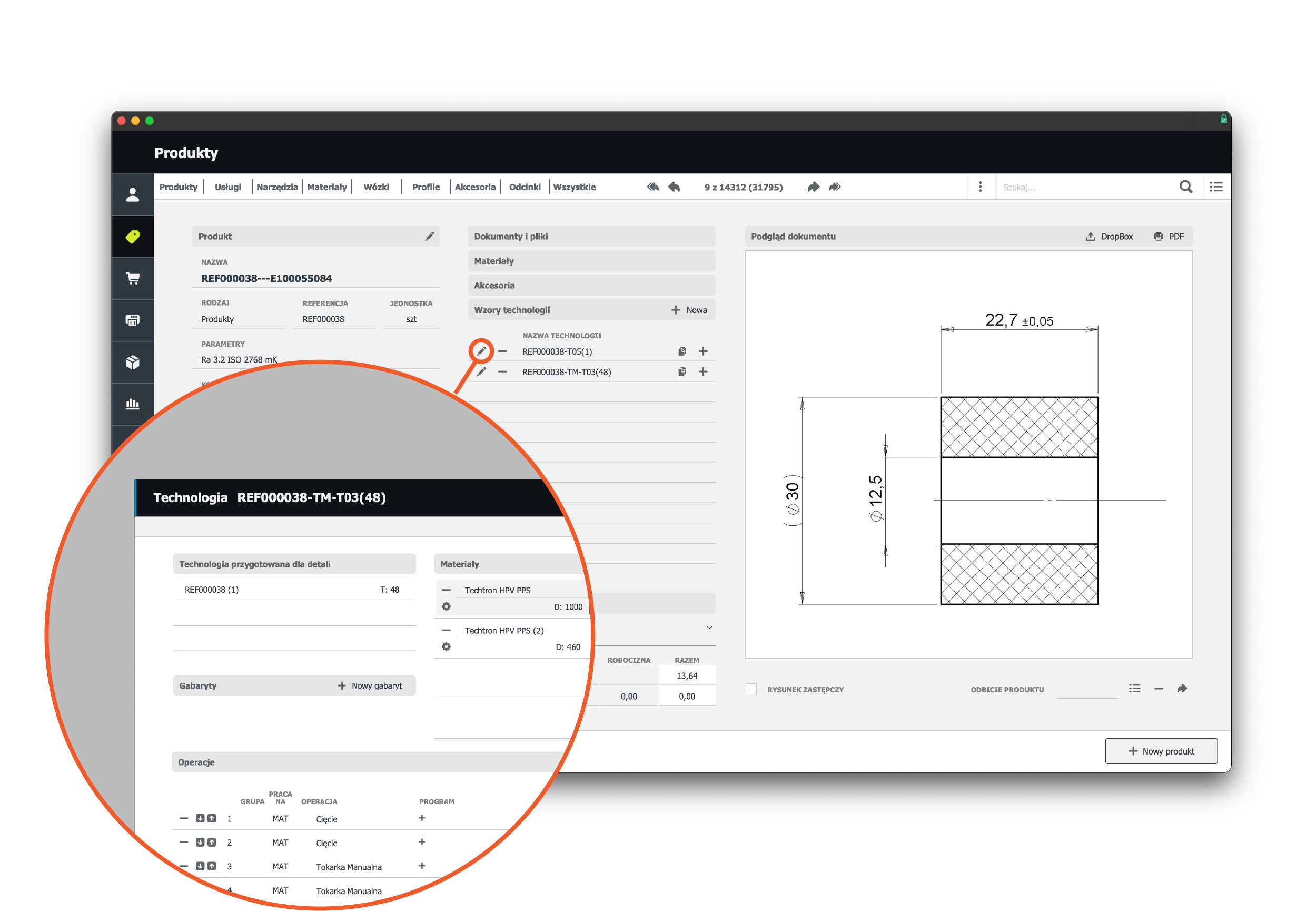
Every product in the system has a product card with a complete set of technical and financial data. On this foundation I build production planning tailored to the specifics of your company. For each product I define, among other things: technical parameters, drawings and documentation, units of measure, costs, prices, links to customers, machine control programs and much more.
Routing templates
Each product can have multiple routings assigned - for example, different process variants for different machines, materials or batches. A routing template defines:
- the list of steps (operations),
- the sequence they are performed in,
- workstations and machines,
- planned times for setup, production and additional operations (such as deburring or fitting accessories),
- the list of materials and accessories required for that routing.
This makes the system more than a register of work orders. It is a practical tool that knows exactly how you make your products - step by step.
The work order as the command centre
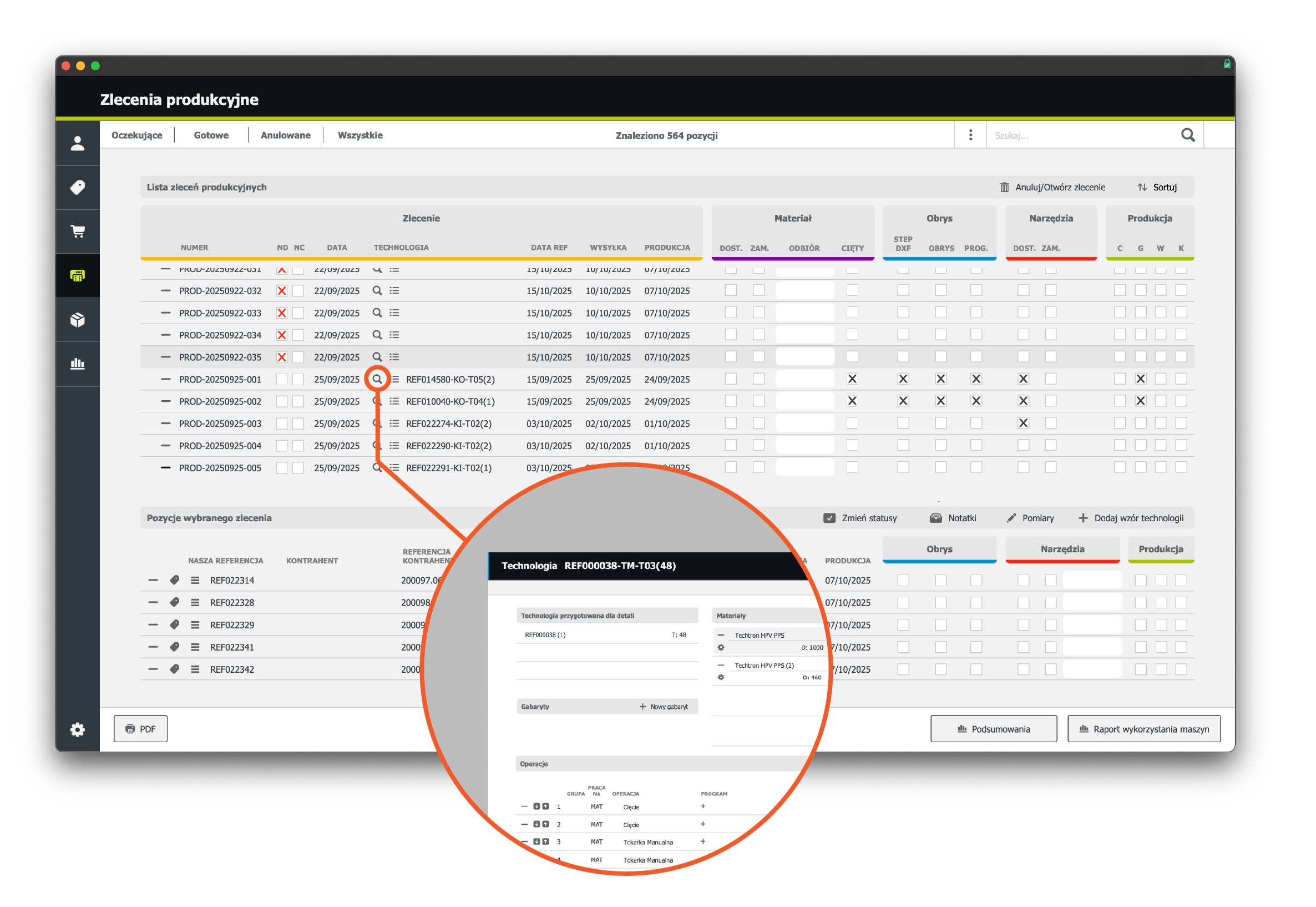
Lines from several orders that use the same routing can be combined into a single work order. It becomes the central point of the planner's and the foreman's work.
In the work order you see:
- the list of lines - what exactly is to be produced,
- the linked routing,
- the status of the main stages for each line, for example: material cutting → in production → completed → after quality control,
- resource readiness: is the material available, are the tools prepared, are the machine programs ready,
- the choice of routing that production will follow.
Statuses in real time
The system uses clear status markers and selection fields, so a single glance shows which work orders are ready to start and which are blocked by a missing resource.
Production planning
Planned versus actual operation times
In the routing details, every workstation and operation has defined planned times (setup, production, additional operations) as well as actual data, collected from every workstation on the shop floor in real time. The system compares the plan with actual execution and colour-codes the results: green - the time is within plan, red - the time has been exceeded. As a result:
- you plan more accurately, because the plan for the next batches is based on real rather than theoretical times,
- you calculate costs more precisely,
- you identify more easily the operations that call for optimisation or investment.
A plan by day and workstation
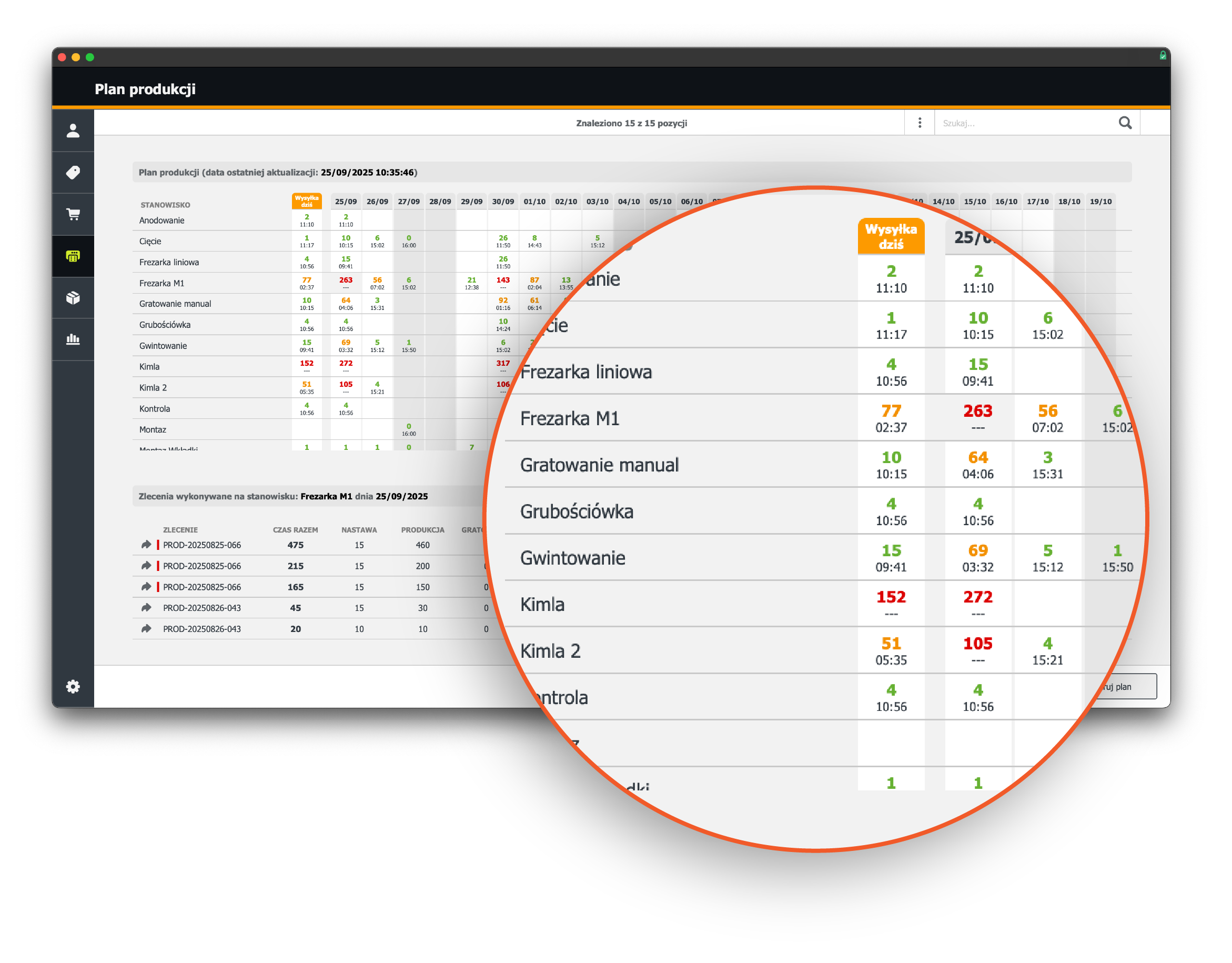
The key element is a planning board that shows the load on every machine and workstation over a horizon of several weeks. Each row is a workstation or machine, each column a specific day, and in the cell you see the percentage load and the time still available that day. There are also special columns:
- Dispatch today - all lines with an execution date of today (or earlier when delayed), but only where dispatch to the customer is set for the current day,
- Current date - all operations that should be completed by today inclusive, regardless of the dispatch date.
The business effect
This way of planning makes it possible to:
- spot bottlenecks quickly (for example, a machine loaded to 272% on a given day - completing the work on time is physically impossible),
- check whether, despite the overload, the critical dispatches are secured,
- move work orders to adjacent days or other machines.
A future-proof system
In later stages of the project, optimisation algorithms and artificial intelligence (AI) can be brought in: working from the collected data, AI arranges the schedule to shorten lead times, balance machine load and availability, and account for customer priorities, employee absences or operator performance. At that point it is more than software - it is a real “brain” for the planner, helping you make better decisions. AI can also enable a “conversation with the system” - making changes to the plan or answering a question such as: “By when can we produce part X in quantity Y from material Z?”
Collecting data on the shop floor: iPads at the workstations
The durability of the system depends on the quality of its data. That is why, alongside the office modules, I also implement a simple operator panel right at the workstation. I equip each workstation with an iPad in a rugged case and an app built in FileMaker Go, connected to the main system. The operator signs in with their own account, selects the workstation they are authorised for, and sees the list of planned operations. For the selected operation they have large, easy-to-read buttons:
- Start/stop setup,
- Start/stop production,
- Finish operation.
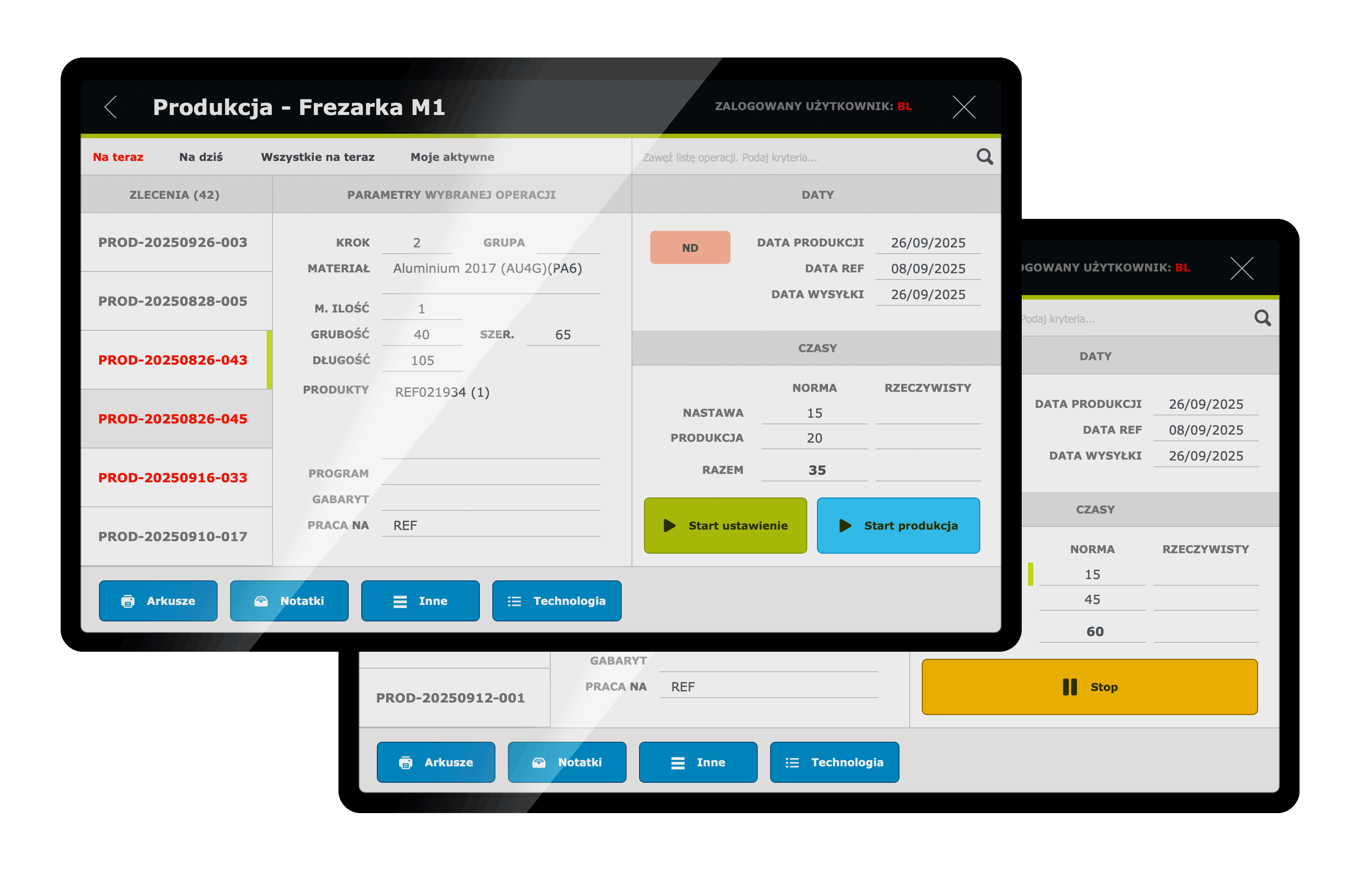
The planner sees current data straight from the workstations, the moment it is created. The system works on “here and now” data, continuously refreshed from the shop floor.
Reports that support investment decisions
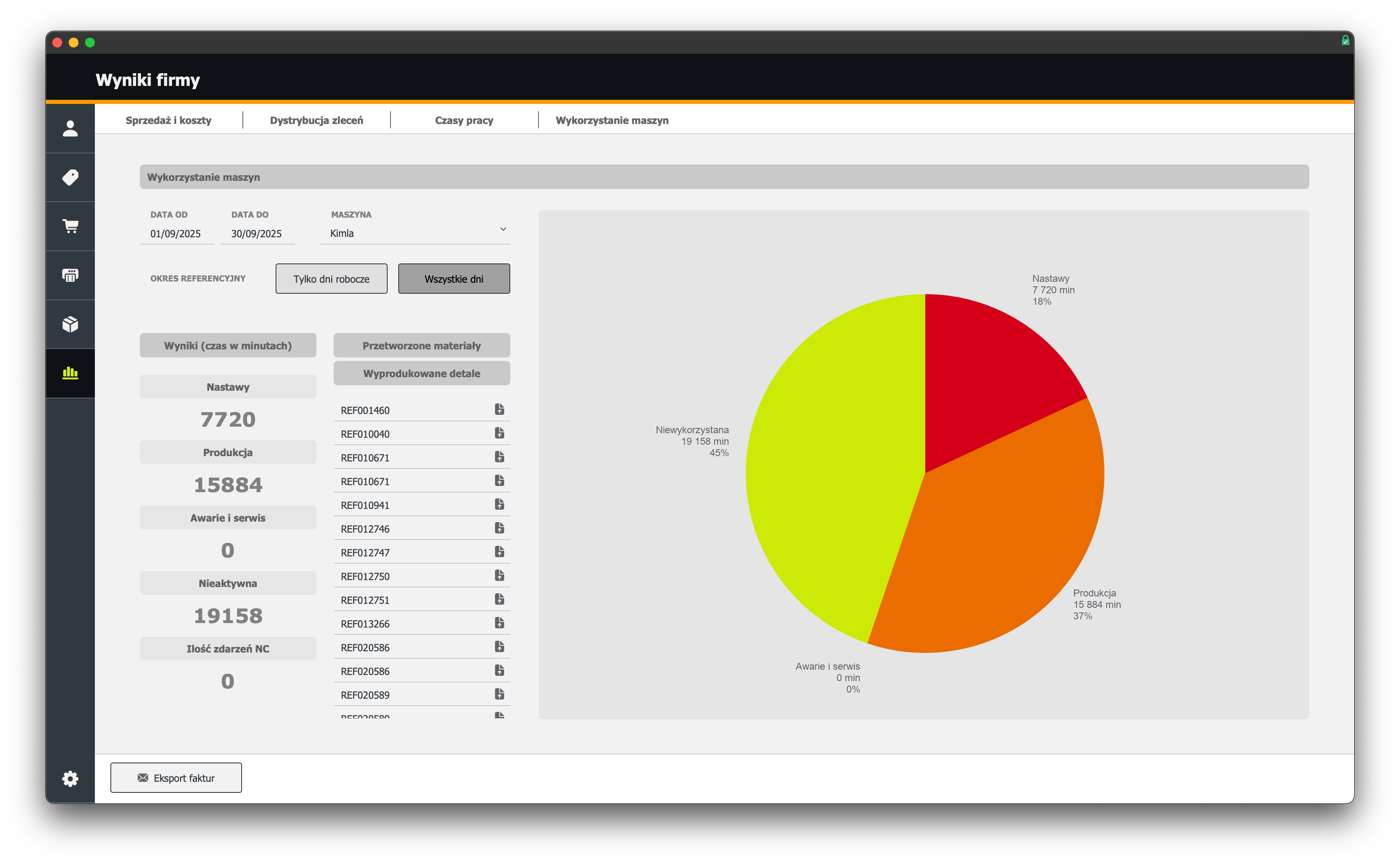
The data collected from routings, work orders and operator panels makes very concrete reports possible. An example from the implementation: in one month, the “Kimla” workstation spent 18% of its time on setups and 37% on production, while the remaining time went unused. The conclusion - buying a second, identical machine is unjustified at this stage, despite the subjective feeling that the machine is “working flat out”. Reports like these turn the system into a real tool for investment decisions and the development of your machinery.
Proven in practice
I designed and built the solution described here individually for my manufacturing client. Claris recognised the implementation as an example of effective use of the FileMaker platform in a manufacturing plant. The case study was published by Winsoft - the exclusive Claris distributor for the EMEA region. Every screen above comes from a system that works on a real shop floor.
Your system can be the same, similar or completely different - tailored to the specifics of your company: a different type of production (one-off, small-batch, high-volume), different machinery, different roles and processes.
What sets my implementations apart
- Individual design - the system is built around your company's real processes.
- Fast and flexible delivery - thanks to the FileMaker platform, which allows software to be developed at remarkable speed with little code, I deliver further modules and changes quickly, without multi-year IT projects.
- No need to plan the full functionality up front - I implement further ideas at the pace at which they emerge while the finished features are already in use.
- Clear interfaces - easy-to-read screens for sales staff, planners, foremen and operators.
- QR codes and barcodes - product identification at every stage of manufacturing and warehouse management.
- Real shop-floor data - operator panels collecting operation times directly at the workstations.
- Growth with the company - as needs arise I add further modules and integrations, creating a system that grows with your business.
The next step
If you would like to see what a similar system could look like in your company - get in touch. We will talk about your current processes and about which of them a custom application can cover. We will look at the areas that consume the most time and should be addressed first. We will agree the first step - at the lowest possible cost - to check how quickly the collaboration delivers results, and we will talk about the stages that follow.
Book 30 minutes or write a message.
The first call is a calm conversation to get to know each other. I check whether I can genuinely help. No slides, no sales pressure. If I see it is a poor fit, I say so directly.
Prefer to write?
Briefly describe what you need - I reply within one business day. Often sooner.
Phone +48 601 789 966 - feel free to call, I answer the phone myself.